

Facebook and Instagram Lead Ads
Facebook Lead Ads CRM integration connects in one click. Leads arrive right away. A safety check also runs every 30 minutes, so no lead slips through.
Best CRM Software
Progbiz is CRM software in India that puts every lead in one place, from Facebook, WhatsApp, website, phone calls, and IndiaMART. It assigns leads in seconds and reminds your team when follow-up is due.
Demo
See a lead move from WhatsApp or Facebook into the queue. Watch it get assigned in seconds. See it show up on the follow-up timeline, with a GPS-stamped visit attached.
Used by growing sales
teams across India












Lead Capture
Your customers reach out in many places. Progbiz brings every message into one list. It saves where the lead came from, which ad brought it in, and which form they used, so you can check later which spend brought which sale.
Facebook Lead Ads CRM integration connects in one click. Leads arrive right away. A safety check also runs every 30 minutes, so no lead slips through.

Add a ready-made form to any page. It blocks spam with a hidden trap field and a simple human check. Every customer gets a confirmation email the moment they send a form.

Progbiz works with Meta's WhatsApp Cloud API, and also with Wati, WhatAPI, and Bitespeed. Turn on "first message creates a lead," and the first message from a customer creates a lead on its own. The full chat stays saved on that lead's record from day one.

3CX CRM integration means an incoming call shows the customer's record before anyone even says hello. A missed call becomes a lead on its own. Every recording attaches to that lead's timeline.
IndiaMART CRM integration comes built in. Any portal that can send a webhook can feed your queue with one simple API key.
Ready-made links connect Zapier and n8n. If a tool can send a webhook, it can send you a lead.
Bring in an old lead list, or leads you collected at an event, in one upload.
A short form on web and mobile covers walk-ins, with duplicate protection built in, so the same customer never gets entered twice.
Features
Progbiz is multi-branch CRM software from day one. Every list and dashboard respects branch, role, and reporting line. A branch manager sees only their branch. A team lead sees only their team. A salesperson sees only their own leads.
Every call, note, and quote becomes one row in the lead's history. Each row shows the recording, the call length, the result, and the next follow-up date and time. This is a CRM with call recording in India, so every talk stays right where it belongs. The reminder fires at the exact minute it is due. If the lead moves to a new person, the reminder moves with it.
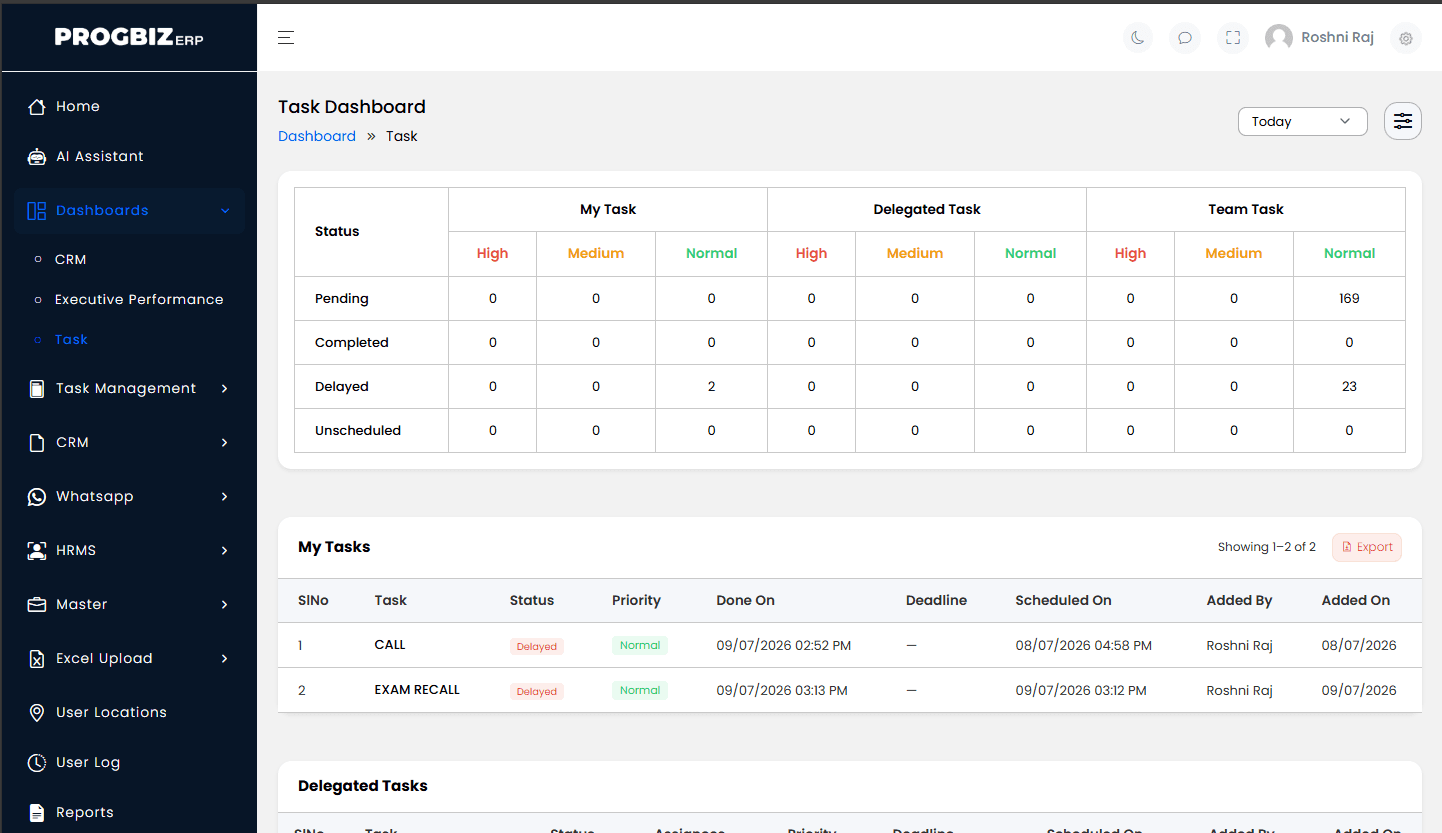
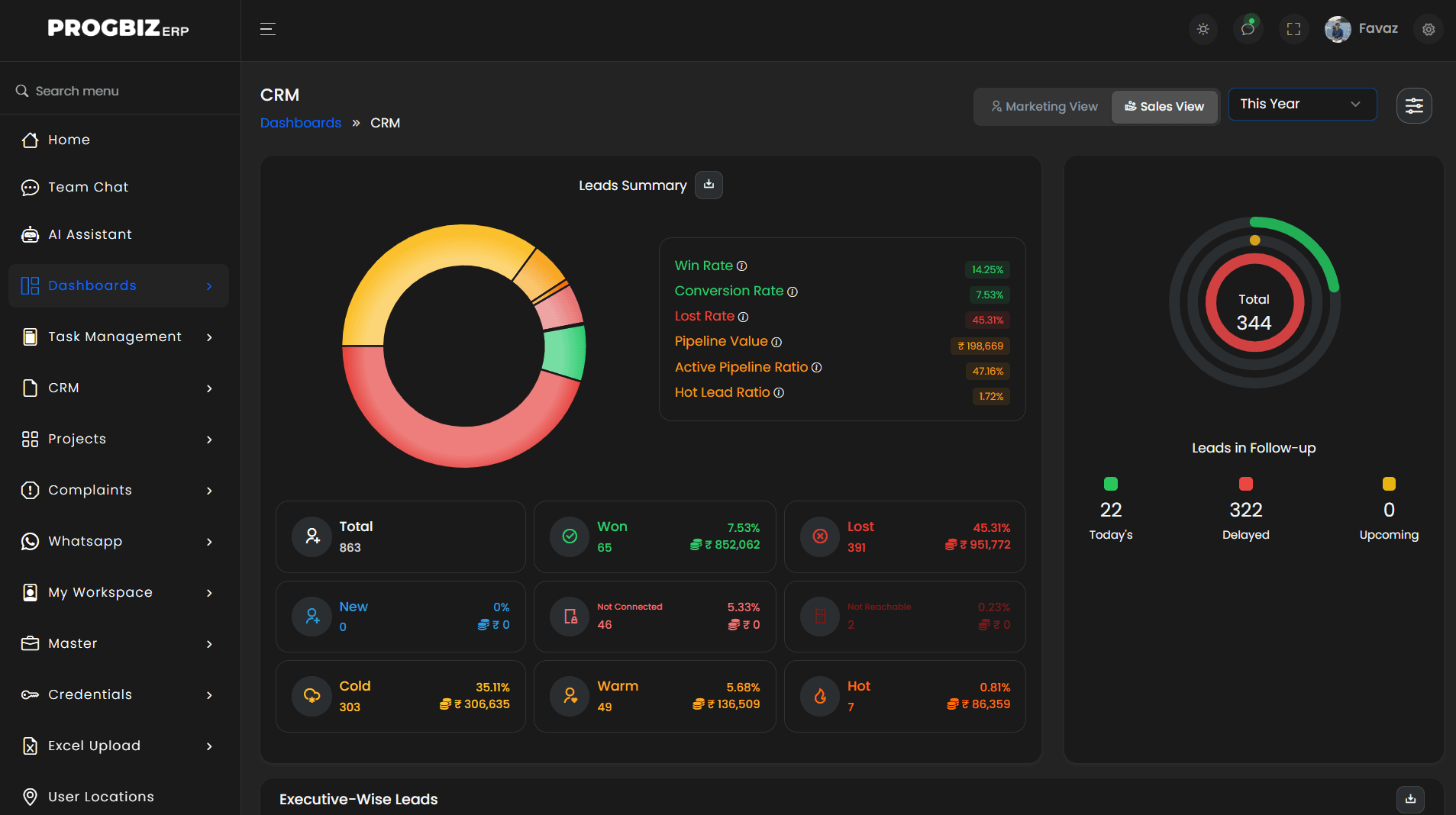
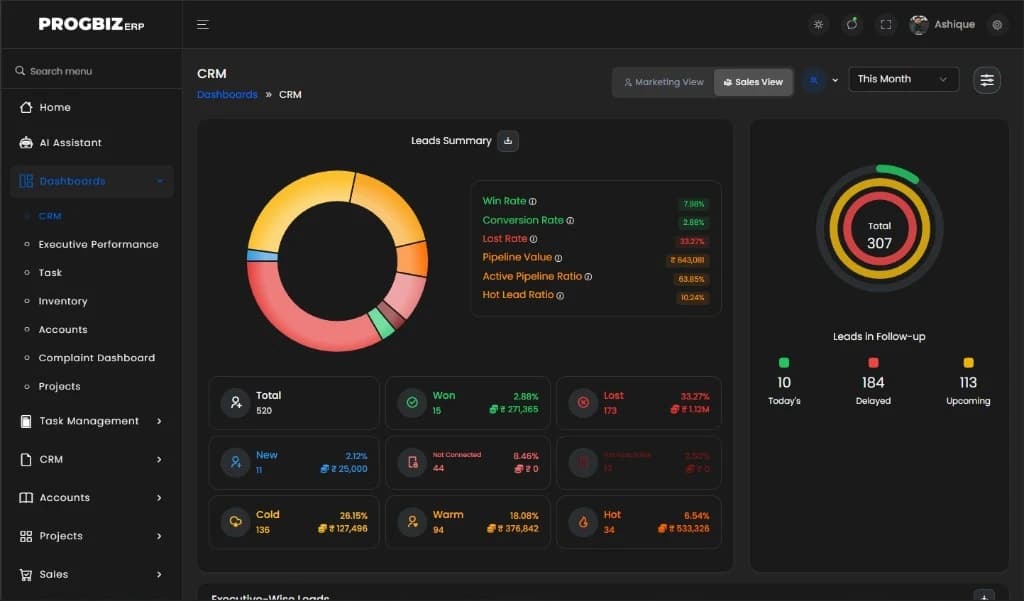
Mark every lead Hot, Warm, Cold, Not Connected, or Not Reachable, and re-mark it after every call. The dashboard shows the mix across your whole pipeline at a glance.
Marking a lead Won turns it into a customer and adds it to that salesperson's target. Marking it Lost saves the reason, so it shows up later in the Lost Leads report. Reasons for losing a deal turn into real data you can act on.
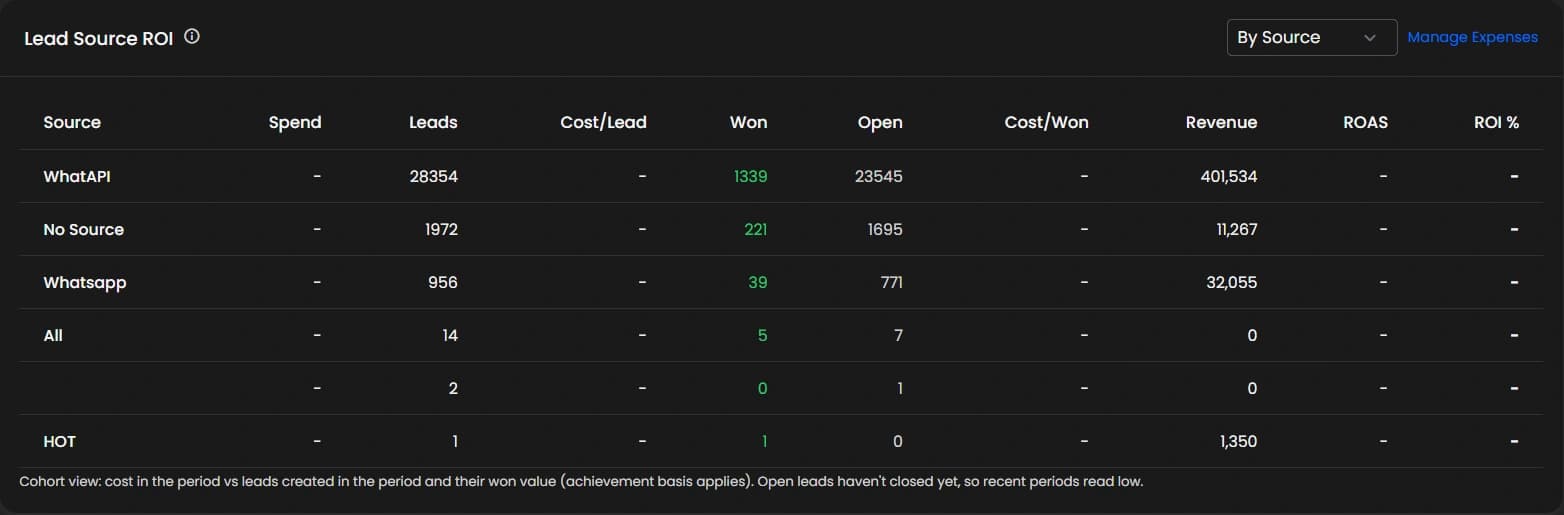
See the cost per lead, the cost per deal you won, and the money made from each source, side by side. Ad spend comes in from Facebook and Instagram every night, with no spreadsheets needed.
See leads, wins, first response time, SLA score, and an overall rating for each person and each branch, and export it all to Excel.
See every call in one place: incoming and outgoing, answered and missed. This covers calls from mobile phones, from 3CX, and from AI voice agents, all together.
See new leads, leads in follow-up, wins, and losses, each with the money attached. It is a chart of real money, not just a list of names. Filter it by branch, person, or time period.
See what's due today, what's overdue, and what's coming up, with overdue leads marked in red. It's the first screen a sales manager should open on a Monday morning.
Send a WhatsApp, email, or SMS the moment a lead arrives or a quote is saved. The PDF attaches on its own after the wait time you choose, and every message sent gets logged.
When someone leaves the team, or a territory changes, move hundreds of leads to a new owner in one click. Reminders move with them, and the full ownership history stays saved.
If a lead source earns a commission, Progbiz tracks it on every won deal. Pay it as one lump sum or bit by bit, and always see the balance owed.
Every list filters by branch, person, time, source, and status. Pull a pipeline snapshot, an enquiry register, or a full customer list with lifetime value, whenever you need it.
Lead Routing
First response SLA CRM means every new lead gets a reply within the number of minutes you set, not whenever someone finds the time.
The moment a lead arrives, it goes to a salesperson, either round-robin across a team or by branch rotation. Both the salesperson and the manager get a push alert right away.
A new question from a customer you already know goes straight back to the person who spoke with them before. No cold hand-offs, and no starting over.
Set a rule like "15 minutes to first touch." If that time passes, both sides get an alert, and the lead can move to someone else on its own.
Set a goal for the month, for each person, team, or branch. Credit a won deal by its enquiry value, its quote value, or its final invoice, whichever way you choose to count it. A gentle nudge lands on the 15th, so nobody finds out they are behind on the last day.
Keep a premium lead source, like a high-value ad campaign, limited to just one team. That way, the best leads never land on the wrong desk.
From Enquiry to Invoice
This is CRM with quotation and invoice built in, not added on from another app. One click turns an enquiry into a quotation, with your branch's own template and tax rules attached. This works across different currencies too, so it fits a business with more than one branch or market. Pull the quotation into a sales order, or go straight to an invoice. Send the PDF over WhatsApp or email in one action. Since accounts run on the same system, the invoice moves stock and updates the ledger by itself. Nothing gets typed twice.
Artificial Intelligence
Progbiz has AI call analysis CRM tools that score every recorded call and coach the person who made it.
When a sales call gets recorded, from the mobile app or from 3CX, Progbiz listens to it and scores it.
It marks the lead Hot, Warm, or Cold, with a confidence score from 1 to 10, so you know how sure the AI is.
It also scores the salesperson on their tone and on how they handled tough questions.
A summary and a coaching note follow every call, along with a suggestion for how the call could have gone better. It is always just a suggestion. It never changes the salesperson's own grade.
It runs on a pay-per-use token wallet, and every scored call shows exactly how many tokens it used, so there are no surprise bills.
Ask a plain question, like "How many leads came in today?" or "Which source worked best last month?" The assistant only shows the data that person is allowed to see, and it works on both the web and the mobile app.
Role-aware answers. Your branch manager's assistant sees only their branch.
Task Management
Most task tools only record what someone says they did. Progbiz records when a task started, when it paused, when it ended, who did it, and where they stood while doing it. That is the difference between a to-do list and a real record you can trust.
Better Together
CRM and Task Management work even better together, because a sale and the work behind it are really the same story.
Log "call back Thursday at 4 pm" on a lead, and a task appears in that person's inbox on Thursday, with the reminder already attached.
Winning a lead can create the delivery, installation, or onboarding tasks automatically, and they stay linked back to that customer's record.
Complaints run as tasks too, with a clear hand-off between teams, so nothing important only gets said out loud and forgotten.
Sales performance and task completion sit on the same scorecard, so results are measured, not just assumed.
Workflow
Facebook, Instagram, WhatsApp, your website, phone calls through 3CX, and portals like IndiaMART.
The enquiry is created, auto-routed to the right person, tracked on the follow-up timeline, and turned into a quotation, then marked Won or Lost.
A task gets created, scheduled, and reminded. It gets started, held, and finished, with checklists, notes, and the time and place logged along the way.
A sales order, an invoice, an updated ledger, live dashboards, and reports you can export any time.
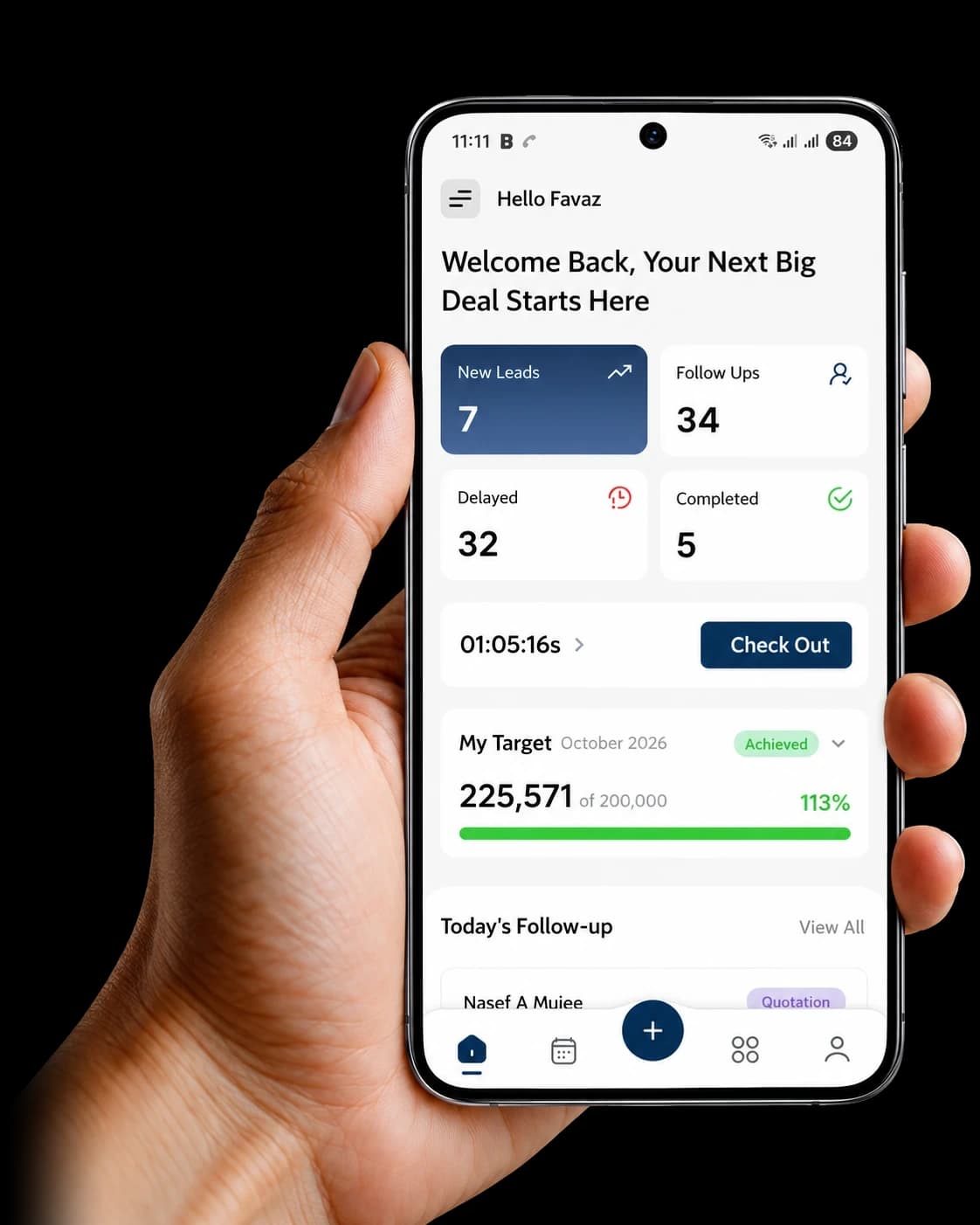
The Progbiz mobile CRM app in India puts everything above in your hand.
Onboarding
Getting started doesn't take months of setup. Most teams are live in under a week, with sample data already loaded and one training session included.
Your own account gets created, with an Owner login.
A branch gets set up, with your users and reporting lines.
Your channels get connected, most in 5 to 15 minutes each: Facebook through the built-in flow, WhatsApp with your account details, 3CX with an integration key, and your website by adding the form.
Your basics get set up: lead sources, follow-up statuses, and task templates.
Turn on extras like first-response SLA, sales targets, and AI call analysis whenever you're ready
Security
Multi-branch CRM software should lock down data at every level — not just hide it behind a menu.
Every request is kept inside your own account. One company's data is never reachable from another's, even on the same server. This is what multi-branch CRM software should look like at its core.
Enforced on every page and every path, not just hidden behind a menu. Remove someone's role, and the door closes everywhere at once.
Certain lead sources can be hidden from certain teams, so a premium channel only reaches the people you choose.
Login sessions use JWT tokens that can be switched off right away, the moment someone's role changes or their access needs to end.
Every website form and webhook is protected with rate limits, a hidden trap field, and a block list, so spam and abuse stay out.
Every incoming webhook, from Meta or any other provider, is checked to prove it's genuine before it's trusted.
Every file and call recording sits on a system Progbiz controls, not a third-party cloud.
From Enquiry to Invoice
Progbiz is built to be one of the best CRM software in India for small business teams, not just big ones. A five-person team gets the same SLA rules, the same pipeline, and the same AI call scoring as a team of fifty. No feature gets stripped out for a "starter" plan, and nothing sits locked behind an enterprise wall. Most small teams don't have a full-time person free to run a long software rollout, so Progbiz is built to go live in under a week, with sample leads and tasks already loaded, so the team can start using it on day one.
From Enquiry to Invoice
CRM software price in India depends on your team size and which parts of the product you use, since a five-person team and a two-hundred-person company need very different things. Progbiz prices by team size and by module, so a small team never pays for features built for a much bigger one. CRM and Task Management can be bought together or on their own, whichever fits your budget better. Ask for the plan sheet to see exactly what sits in each plan.
From Enquiry to Invoice
Three questions settle most of it. Does it connect to the places your leads actually come from? Does it prove the work got done, not just record what someone typed? Can your team use it from day one, without weeks of training? If the answer to all three is yes, that CRM software in India is the right fit for you.
We also have pages built for a few specific setups. Teams based in one city can look at our Kerala, Chennai, Bangalore, or Mumbai pages. If you only need the task and field tracking side, without the full sales pipeline, our task management software page covers that in more depth.
Mobile App
Progbiz CRM is mobile-friendly, so your sales team never has to wait to get back to a desk. With the app on Android or iPhone, they get new leads, follow-up reminders, and customer details wherever they are. Every update they make on the phone shows up in the office straight away. They can log a follow-up right after a call, while the details are still fresh. Managers can check the team’s day from their own phone, without calling anyone for an update.
How Progbiz Compare
Among the best CRM in India, the right pick is the one that fits how your team already works. If you are comparing CRM software in India before you buy, here is where Progbiz stands next to three well-known names. You can also read our full roundup of CRM software options in India if you want a wider list to check against.
| What You Need | Progbiz | Zoho | Freshsales | HubSpot Free |
|---|---|---|---|---|
| WhatsApp (4 providers) | All four | Partial | Limited | No |
| IndiaMART integration | Built in | Add-on plugin | No | No |
| 3CX screen-pop | Yes | Third-party | Built-in | No |
| SLA with auto-reassign | Yes | Enterprise plan | No | No |
| AI call scoring | Built in | Add-on | Different | No |
| Field visit tracking with GPS | Full task-level tracking | Check-in only | No | No |
| Quote to invoice to ledger | One platform | Separate apps | No | No |
| Task pools and clock | Full | Basic | Basic | Basic |
| Nightly ad-spend import | Automatic | Manual | Manual | Manual |
| Multi-branch support | From day one | Yes | Limited | No |
Experience the Advantage

Here's what our customers experienced.

Testimonials
Here's what our customers experienced.
As an proffesional academy that also offers degree programmes, we get student enquiries every day from Instagram, our website, and WhatsApp. Before Progbiz ERP, many of these got lost between calls and spreadsheets. Now every enquiry lands in Progbiz CRM, our counsellors get reminders for each follow-up, and we can see exactly which courses and ads bring in real admissions. With the WhatsApp API, students get quick replies, course details, and batch updates without our team typing the same message again and again. Progbiz ERP keeps our admissions, fee collections, and receipts in one place, so our office and accounts team finally work from the same numbers. The Progbiz team understood how an education business runs and set everything up around our process, not the other way round. We’d happily recommend them to any institute that wants to stop losing students to slow follow-ups.
Progbiz CRM makes running our hardware business so much easier. It's the best CRM for hardware companies. Easy to use, keeps our inventory organized, and helps us manage customers better. Their team really gets what we need. We highly recommend it to any hardware business.
Progbiz did an outstanding job developing our Lesol Solar software! Their team was professional, responsive, and truly understood our needs for a user-friendly solar solution. The software’s clean design and powerful features have streamlined our operations and impressed our clients. They delivered on time, provided excellent support, and made the process seamless. Highly recommend Progbiz for any software development needs—top-notch quality and service!

Progbiz CRM brings in leads from WhatsApp, Facebook, phone calls, IndiaMART, and website forms. It assigns each lead to a salesperson in seconds, tracks every follow-up, and proves field work with GPS and timestamps. Progbiz Private Limited builds it in Kannur, Kerala.
Facebook, Instagram, WhatsApp (Cloud API, Wati, WhatAPI, and Bitespeed), 3CX, IndiaMART, Zapier, n8n, Excel, and walk-in entries. Every lead keeps its source, ad, and form attached.
It's the delivery side of the platform. Every follow-up, service visit, complaint, and project step becomes a task with a start time, an end time, who did it, and where. It's sold on its own, but it's built to work as one system with the CRM. If your team makes promises to follow up, or sends people out to sites, you need it.
Yes. You can start your CRM software free trial in India with no card needed. The trial account comes with sample leads and tasks already loaded, so your team can try every feature before deciding.
It listens to recorded calls and gives a lead score, an agent score, a summary, and a coaching note, always as a suggestion, never overriding the salesperson's own judgment. It also answers plain questions about your data through the AI Data Assistant. Both run on a pay-per-use token wallet.
Yes. GPS location is saved at the start and the end of every task. It stays optional, and the team can see it on their own terms.
Yes, from day one. Each branch keeps its own calendar, tax rules, and message templates. A branch manager sees the branch, a team lead sees the team, and a salesperson sees only their own leads.
Yes. One click carries a lead through to a quote, then to an invoice. The PDF goes out over WhatsApp or email, and stock and the ledger update by themselves.
Among the best CRM in India, Progbiz stands out for pulling WhatsApp, phone calls through 3CX, and IndiaMART leads into one queue, with an SLA timer and AI call scoring built in, not added on later.
As one of the best CRM software in India, Progbiz has SLA with auto-reassign, AI call scoring, GPS field tracking, and quote-to-ledger automation, all on one platform. The table above shows where each tool stands.
Under a week for most teams. Sample data loads ahead of time, one training session is included, and channels like Facebook, WhatsApp, and 3CX usually connect in minutes, not days.
Progbiz CRM comes from Progbiz Private Limited in Kannur, Kerala. Support runs in the language your team is comfortable with, from people who understand how business really works here. That is what CRM software in India should do for a growing sales team.